


On 21 October 2026, the PHP project released emergency fixes for two critical security flaws, now known as PHP2Shell. PHP is the code running behind nearly 70% of the websites whose technology can be identified, including sites built on platforms such as WordPress, Drupal, Joomla, and Magento.
Within hours, the UK's National Cyber Security Centre (NCSC) and the US Cybersecurity and Infrastructure Security Agency (CISA) were telling organisations to patch immediately, or take their sites offline. Some did exactly that: the BBC reported organisations in Finland and the Netherlands, and the City of Edinburgh Council, taking websites offline while teams worked to update.
For most marketing and website teams, the week looked much the same: chasing hosting providers, checking PHP versions, and waiting on developers to confirm the site was safe.
Patches are available. But it won't be the last vulnerability of its kind, and it raises a question worth asking once the dust settles: who is responsible for keeping your website secure, and what is that really costing your business?
In this post, we explain what PHP2Shell is and how it happened, what to do right now, and how to decide whether your CMS still fits.
What is PHP2Shell, and how did it happen?
PHP2Shell is the name for two critical vulnerabilities in PHP itself, the programming language that sits underneath your CMS. Both are rated 9.2 out of 10 for severity. In the right conditions, they let an attacker run their own code on a web server without a password or login. The PHP project says every PHP installation that serves web pages is at risk.
The problem had been building for a while. A 2024 external security audit helped surface concerns about how PHP handles memory, but the impact was not yet clear. In 2026, multiple security researchers demonstrated that the issue could permit remote code execution, leading to the emergency release.
AI runs through this story. The PHP Foundation used AI tools to scan PHP's code and validate incoming reports, and says AI-assisted research has sharply increased the number of vulnerabilities being found: it has published 15 CVEs since July alone. The same tools that help defenders find flaws also help attackers exploit them faster.
On 20 October, the vulnerability IDs leaked a day before the fix was released. Amazon's threat intelligence team says it had already spotted an attempt to exploit the flaw on 17 October, and attempts spread quickly once the news broke.
Exploitation attempts and scanning have been reported. If your site was internet-facing and unpatched, ask your technical team to check for signs of compromise as well as applying the fix.
What should you do right now?
If your website runs on a PHP-based platform, patch first, whatever you decide about your CMS later. The guidance from the NCSC, CISA, and the major CMS projects comes down to five steps:
- Find every PHP system. That means your main site plus staging sites, microsites and anything your agency hosts for you.
- Confirm PHP is patched and restarted. Ask your host or developer to confirm in writing that every live server is running a fixed PHP release, or an equivalent patched package from its provider, and that the PHP service has been restarted.
- Don't rely on a CMS update. The flaw sits underneath your CMS. As WordPress.org put it: "No WordPress update is required or planned for these issues."
- If you can't patch yet, limit the risk. A web application firewall can buy time, but it isn't a fix. The NCSC advises considering taking unpatched sites offline.
- If you were exposed, check for compromise. If a site was internet-facing and unpatched, ask your technical team to check for signs of compromise.
Running PHP 8.1 or earlier? Those versions are no longer supported. PHP has published only basic source patches for them, and CISA advises taking unpatched systems offline until they can be upgraded.
Why does this keep happening on a self-hosted CMS?
Patching PHP2Shell solves this week's problem. It doesn't change why it was your problem in the first place.
A self-hosted website isn't one piece of software. It's a stack of them: the server, the PHP runtime, the CMS core, the theme, and every plugin you've added over the years. Each layer gets its own updates, on its own schedule, and each update needs testing so it doesn't break something else.
That adds up. Security firm Patchstack recorded 11,334 new vulnerabilities in the WordPress ecosystem in 2025, a 42% rise on the year before, and 91% of them were in plugins. Research presented at the NDSS security conference in 2025 found that more than half of CMS installations were missing the latest security patches, often because updates felt risky, costly or like someone else's job. And with AI helping to find flaws faster, the pace is unlikely to slow down.
None of this means self-hosting is wrong. It can work well with clear ownership, a reliable hosting partner and the budget to keep on top of it. The question is whether that's the best use of your team's time.
Who owns the problem when something breaks?
The week PHP2Shell broke, HubSpot co-founder and CTO Dharmesh Shah posted on LinkedIn about what the episode really taught us. In his view, the lesson wasn't about which technology you choose, but about your technology strategy:
"The question is: 'Who owns the problem when there's a failure?' Who gets the call at 2am on a Tuesday if something goes wrong?"
For a self-hosted website, the honest answer is usually you. Or your agency, your hosting provider and your IT team, each owning a slice, with nobody owning the whole. When something like PHP2Shell lands, someone has to work out what's affected, chase the fixes, test them and confirm the site is safe. That's time and budget pulled away from campaigns, content and the work that actually grows the business.
As Dharmesh put it: "When you pay for software, you're not paying just for lines of code... you're paying for sleep not lost for your team."
So the better question for marketing and IT leaders isn't "Can we keep our CMS secure?" It's "Should this be our job at all?"
Is HubSpot affected?
No. HubSpot's official position is:
"PHP is not part of HubSpot's infrastructure, and we are not currently aware of any impact to our platform or customers. We will continue to monitor the situation and provide an update if our assessment changes."
Dharmesh confirmed that HubSpot doesn't use PHP "in our website/CMS product or our core CRM applications", and was candid that, this time, that was partly luck.
The bigger point is what HubSpot customers didn't have to do. Websites built on HubSpot Content Hub didn't need anyone to check PHP versions, chase a host or test patches over the weekend. Because HubSpot hosts and maintains the platform, the 2am call goes to HubSpot, not to your team, whatever the next vulnerability turns out to be.
What does Content Hub take off your plate?
HubSpot Content Hub is a fully managed CMS. Instead of your team looking after a stack of software, HubSpot runs the platform for you. In HubSpot's own words: "HubSpot takes care of hosting and maintaining your pages, so you don't have to worry about plugin management, updates, hosting, scaling, or security."
In practice, that means:
- No server or runtime to patch. HubSpot hosts and maintains the platform, so there's no PHP version to check, no server to update and no emergency patching cycle when the next vulnerability hits.
- Built-in protection. Every Content Hub site sits on a global content delivery network (CDN) with a web application firewall built in. SSL certificates are provisioned automatically, for free, on every connected domain.
- No plugin stack to maintain. Forms, SEO tools, personalisation and analytics are native features, not third-party add-ons that each need updating, testing and trusting.
- Reliability you can plan around. HubSpot commits to commercially reasonable efforts to meet 99.95% service uptime each month.
- Built-in site monitoring. Performance and technical issues show up in HubSpot, so you're not stitching together separate tools to see how your site is doing.
Here's how responsibility shifts:
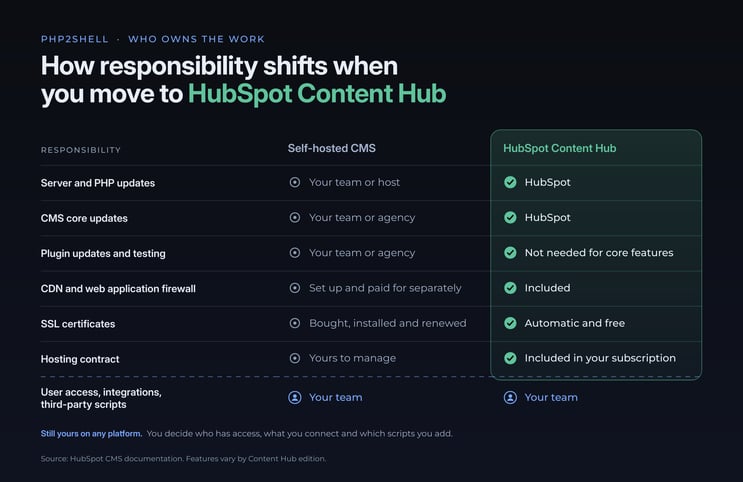
That last row matters. No platform removes every risk, and your team still decides who has access, what you connect to your site and which scripts you add. But the heavy, unglamorous work of keeping the platform itself secure and up to date stops being your job.
What else do you gain?
Less maintenance is the obvious win. The bigger one is what your website can do once it's part of HubSpot.
Your website and CRM become one system. Every form fill, page view and content interaction lands straight in the same CRM your marketing and sales teams already use. There's no plugin syncing data between systems, and no gaps when the sync breaks.
Personalisation without the plumbing. Because the website knows what the CRM knows, you can tailor content to whoever is visiting, whether that's a first-time visitor, an existing lead or a customer.
AI built into your content workflow. Content Hub includes AI tools to help you create, repurpose and manage content, including an AI blog writer, Content Remix for turning one piece into many, and Brand Voice to keep everything sounding like you. HubSpot AEO also shows how your brand appears when buyers ask AI tools questions.
Reporting that connects content to revenue. Instead of stopping at page views, you can see which pages and posts influence leads, deals and customers.
*Features vary by Content Hub edition.
The goal isn't just a website that's easier to look after. It's one that works harder for the business.
Is Content Hub right for you?
PHP2Shell is a useful moment to take an honest look at how your website is run. Ask yourself:
- Who patches your platform today, and how quickly? If it took more than a few emails to find out this week, ownership isn't clear.
- How much agency or developer time goes on maintenance? Updates, plugin conflicts and hosting issues all cost money that could be going into improvements.
- Is your website connected to your CRM? If leads arrive by email, spreadsheet or a plugin that breaks now and then, you're missing the full picture.
- Can your marketing team make changes without a developer? If simple edits wait in a queue, the site is slowing you down.
- Did PHP2Shell cost your team time this week? That time is the clearest sign of what maintenance really costs.
If two or more of these feel uncomfortable, Content Hub is worth a serious conversation.
It's not the right fit for everyone. Highly custom web applications or complex eCommerce builds may still be better on a dedicated platform. But for most B2B marketing websites, the case for moving the maintenance burden to HubSpot is strong.
How does Struto migrate you to Content Hub?
Moving your website is a big decision, and a good migration is more than copying pages from one platform to another. As a HubSpot partner, Struto plans every move around your content, your search visibility and your business priorities.
- Assess. We review your current website's content, functionality, integrations and performance, and agree what should stay, what should change and what can be retired.
- Plan. We map out the move, including SEO, URL redirects, tracking and forms, to protect your search visibility and leads through launch.
- Migrate and build. We bring your content across and build your site on Content Hub, connected to your HubSpot CRM from day one.
- Hand over. We train your team so they can update pages, publish content and make changes without waiting on a developer.
"Our automated migration tools reduce manual effort, making the move more efficient and cost-effective than a fully manual rebuild." - Renier van Jaarsveld, Product Owner: strutoCX
Every website is different, so we scope each migration around your existing site, data and goals.
Is it time to reassess your CMS?
Patch and assess your site today, whatever you decide next. Then ask yourself whether you want to keep owning the next one.
If you'd rather spend your team's time growing the business than maintaining a website platform, let's talk. We'll look at your current site, what it costs to run and what a move to HubSpot Content Hub would involve, with no obligation and no pressure.
Book a CMS migration conversation
*Outcomes and timelines depend on your existing website, data readiness, resourcing and agreed scope.

