When choosing a CRM for Microsoft Business Central, businesses must decide between a "Single Vendor" approach with Dynamics 365 or a "Best-of-Breed" strategy using HubSpot. While Dynamics 365 offers ecosystem unity, HubSpot provides a superior user experience and robust marketing automation tools that drive higher team adoption. By using middleware like strutoIX to bridge the two systems, companies can achieve seamless data synchronisation without sacrificing front-office performance.
On the surface, choosing Dynamics 365 for your CRM seems like the logical next step. It lives within the same Microsoft ecosystem, promising a native fit. However, the most logical path is not always the most strategic one for growth.
An increasing number of businesses are opting for a "best-of-breed" approach, pairing Business Central with HubSpot's world-class CRM platform. The question is, why? The answer lies in prioritising user experience, marketing power, and front office excellence, all while ensuring your back office and front office are perfectly synchronised.
This post explores the two choices, helping you decide which path best aligns with your company's ambition.
What Is the Difference Between Single Vendor and Best-of-Breed Architectures?
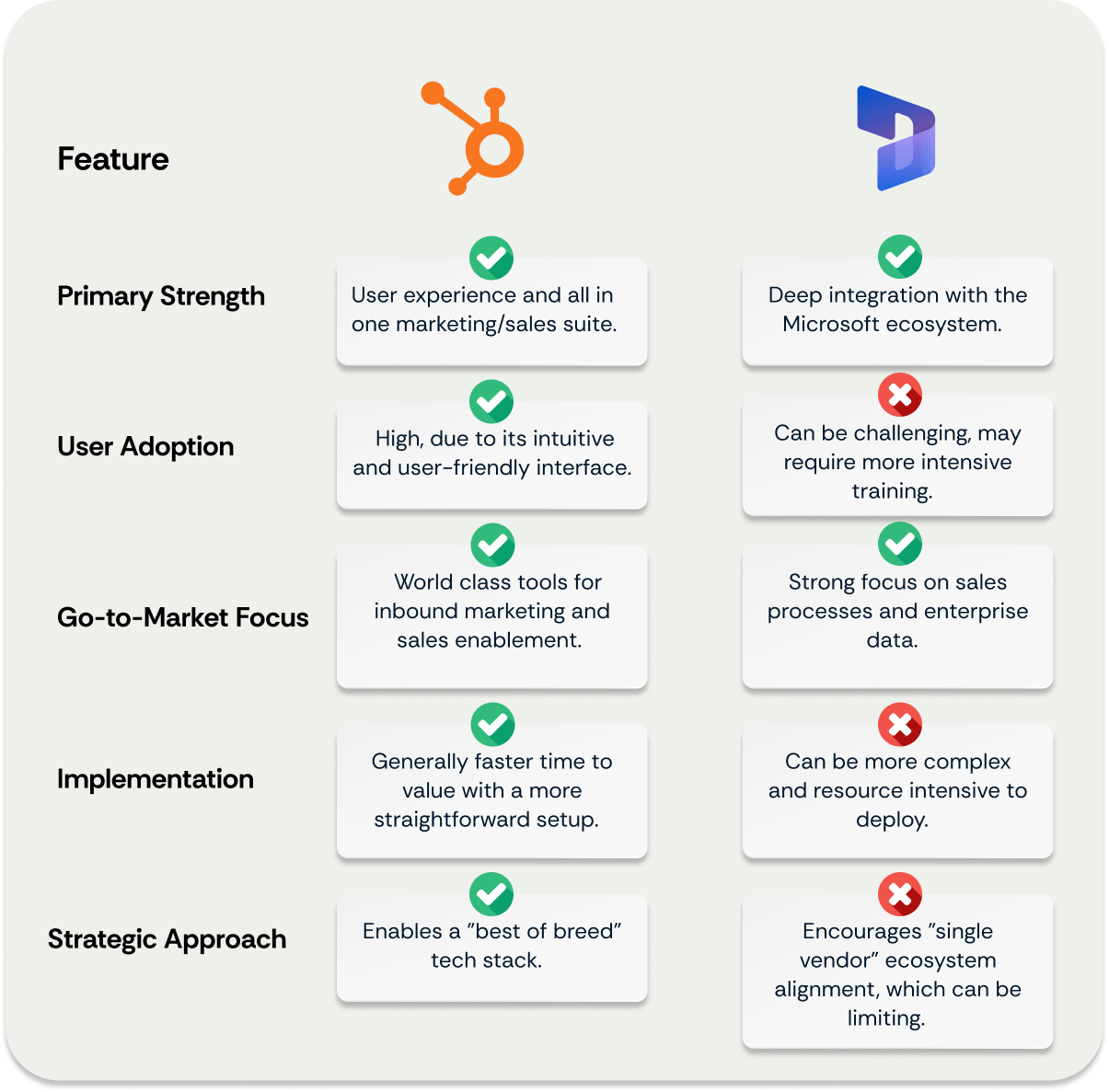
The decision between Single Vendor and Best-of-Breed architectures is a strategic choice regarding how you source core software. A Single Vendor strategy, such as using Dynamics 365 for both CRM and ERP, prioritises procurement simplicity and native ecosystem fit. In contrast, a Best-of-Breed strategy focuses on equipping each department with the superior tool for their specific function—HubSpot for high-performance sales and marketing, paired with Business Central for robust finance operations. For companies prioritising growth and customer experience, the Best-of-Breed approach often yields better results by avoiding the usability compromises inherent in all-in-one suites.

Why Does HubSpot Drive Higher User Adoption?
HubSpot drives higher user adoption because it is designed specifically for marketers and salespeople, prioritizing a clean, intuitive interface over complex technical configuration. A CRM is only effective if the team uses it consistently to input data; complexity in platforms like Dynamics 365 can become a barrier to engagement. When teams enjoy using their software, data entry becomes consistent, leading to reliable reporting, accurate forecasting, and a Single Source of Truth that leadership can trust.
How Does Marketing Capability Differ Between the Platforms?
Marketing capability differs significantly, as HubSpot was built from the ground up as a unified engine for inbound marketing, content management, and sales enablement. Its tools work in harmony to attract and engage customers seamlessly. Conversely, while Dynamics 365 offers robust sales functionality, its marketing capabilities are often housed in separate applications or require complex setups. For organisations seeking a cohesive front-office engine that unites marketing and sales without friction, HubSpot provides a distinct advantage.
How Can You Integrate HubSpot with Business Central?
You can integrate HubSpot with Business Central using a robust middleware solution like strutoIX, which acts as a bridge between the two platforms. This connector ensures that customer data, sales orders, product information, and invoices flow automatically and accurately between the CRM and ERP. This synchronisation empowers teams with a true 360-degree customer view, allowing sales reps in HubSpot to see financial data like payment status and credit limits without leaving their preferred interface.
What Are the Real-World Benefits of Integration?
The real-world benefits of integration include enhanced operational efficiency and the elimination of manual data entry errors. For example, a global leader in fire detection solutions recently used strutoIX to connect their HubSpot front office with their Business Central back office. The transformation was immediate: automated data synchronisation eliminated hours of manual reconciliation, streamlined the quote-to-cash process, and provided consistent data visibility across sales, marketing, and finance departments. This proves that a Best-of-Breed strategy, underpinned by quality integration, delivers tangible business value.
A Simple Comparison: HubSpot vs Dynamics
Success Story: How Seamless Integration Drives Efficiency
Choosing a best-of-breed approach is not just a theoretical advantage. We saw this firsthand with a global leader in fire detection solutions.
The Challenge:
The company operated with a fragmented tech stack. Their front office, running on HubSpot, was disconnected from their back office in Business Central. This created data silos, causing operational inefficiencies, hindering real-time data insights, and impacting everything from decision making to customer engagement. They needed a reliable bridge between their two most critical systems.
The Solution:
The company chose strutoIX to create that bridge. Over two months, our integration specialists deployed strutoIX as the middleware to facilitate a seamless, two-way data flow. The project focused on synchronising customer, order, and product data between HubSpot and Business Central, creating a single, unified view of the customer journey.
The Results:
The transformation was immediate. With data synchronised automatically, the company eliminated countless hours of manual data entry and reconciliation. Their teams now operate with heightened efficiency and can access consistent data across departments, from sales and marketing to finance and operations. This has not only enhanced internal processes but has also positively impacted their customer interactions, enabling a faster, more informed service.
As our Product Owner, Marc Howell, noted:  "Implementing strutoIX for the integration between Business Central and HubSpot has been a game changer. The seamless data flow we’ve achieved enables their team to operate with improved efficiency and responsiveness, directly impacting their ability to provide superior service to their clients."
This success story highlights a crucial point: the power of a best-of-breed strategy is unlocked by the quality of the integration.
strutoIX: The Bridge Between Best of Breed Systems
Choosing HubSpot does not mean sacrificing a connection to your financial core. Our strutoIX connector for Business Central and HubSpot is designed to give you the best of both worlds. It ensures that customer data, sales orders, product information, and invoices flow automatically and accurately between the two platforms. This synchronisation empowers your teams with:
-

A True 360-Degree Customer View:
Sales and marketing teams in HubSpot can see financial data from Business Central, like payment status and credit limits.
-

Streamlined Quote to Cash:
Convert HubSpot deals into Business Central sales orders with a single click, eliminating manual processes and errors.
-

Accurate Data You Can Trust
Eliminate duplicates and discrepancies, ensuring your reporting and forecasting are based on reliable information.
People Also Ask (FAQ)
Can HubSpot replace Dynamics 365 Sales?
Yes. HubSpot Sales Hub Enterprise offers enterprise-grade features such as custom objects, advanced permissions, and programmable automation that rival Dynamics 365 Sales, often with better usability.
Is custom coding required to connect HubSpot and Business Central?
Not necessarily. While you can build a custom API connection, using a managed integration platform like strutoIX is faster, more secure, and ensures ongoing maintenance without the need for internal developer resources.
Does HubSpot integrate with Microsoft 365 (Office)?
Yes. HubSpot has a deep native integration with Microsoft 365, allowing users to log emails, sync calendars, and schedule meetings directly from Outlook, regardless of whether they use Business Central.
What data should sync between CRM and ERP?
Key data points to sync include Contacts, Companies (Accounts), Deals (Opportunities) converting to Orders, Product Libraries, and Invoice status. This ensures sales teams sell available inventory and finance teams have accurate billing details.
The Verdict: Which CRM is Right for You?
If your priority is consolidating your technology under the Microsoft banner and your teams are already deeply embedded in that ecosystem, Dynamics 365 is a solid choice.
However, if your strategic priority is growth, driven by a world-class marketing engine and a sales team empowered by a CRM they love to use, HubSpot is the clear winner. It allows you to equip your front office with the best tools on the market.
With a robust integration solution like strutoIX, you no longer have to compromise. You can pair the operational power of Business Central with the customer facing excellence of HubSpot, creating a cohesive and powerful infrastructure that sets the stage for future success.
Ready to get the best of both worlds? Book a consultation with one of our integration specialists to learn how strutoIX can seamlessly connect your HubSpot CRM and Business Central ERP.
Business Central Webinar:
Watch our on-demand webinar to discover how integrating Microsoft Dynamics 365 Business Central with HubSpot can banish data silos and manual processes for good.
Sean & Ryan from Struto take a deep dive into “Streamline Data & Processes: Business Central to HubSpot Integration Webinar".
Watch the on-demand webinar here!